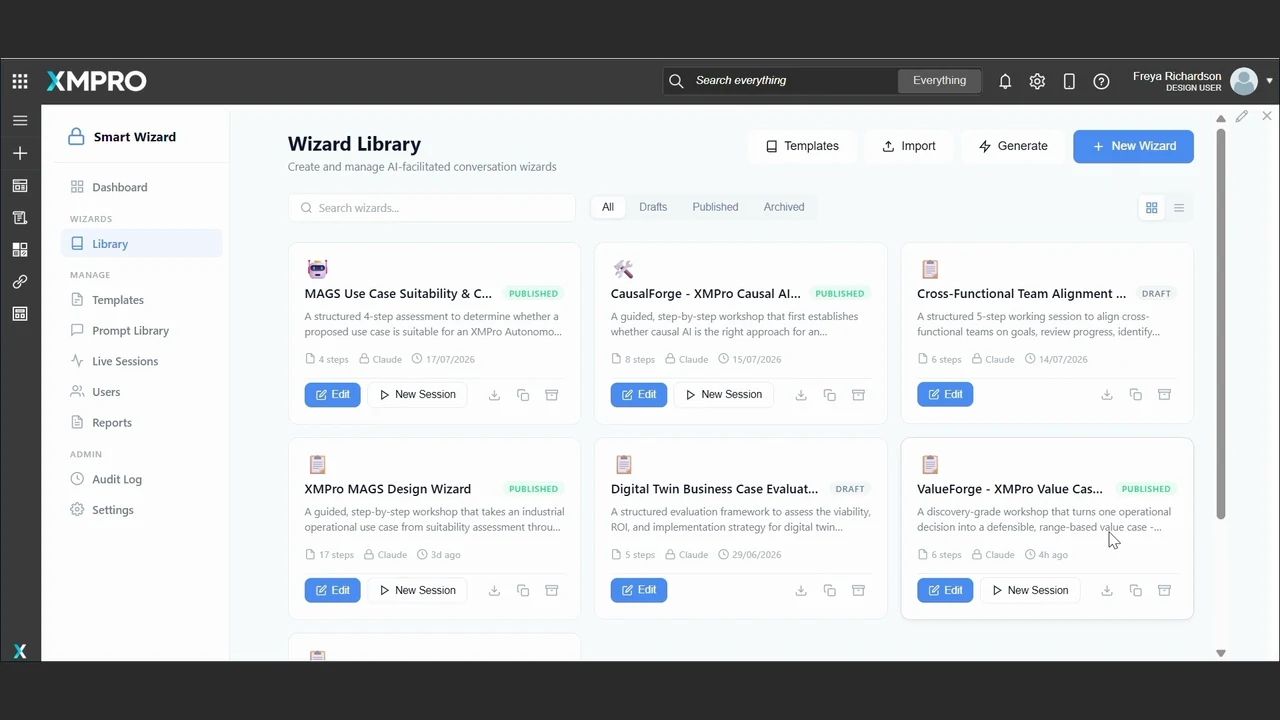
ValueForge starts with problem and value discovery. Other wizards explore causal AI, digital twins or agent suitability in more depth.
MAPublished
MAGS Use Case Suitability
Explore the fit for multi-agent systems.
4 steps
EditNew Session ↗
CFPublished
CausalForge
Frame a causal AI opportunity.
8 steps
EditNew Session ↗
DTPublished
Digital Twin Business Case
Evaluate a digital twin opportunity.
5 steps
EditNew Session ↗
VALUEFORGE · NEW SESSION
Depropaniser operating decision
Discovery
1Decision
2Signals
3Authority
4Value
5Pressure test
6Value case
FRAME THE RECURRING DECISION
What decision keeps coming back?
How hard should we run the depropaniser as feed conditions change?
DECISION OWNERShift operator
TRIGGERFeed changes
Generate summary
Name a recurring decision
Identify who makes the call, what triggers it and what getting it wrong costs. A recurring decision gives the use case a clear focus.
DECISION SUMMARY
Protect quality. Avoid unnecessary energy use.
Balance recovery and operating cost without crossing process limits.
A specific decision, not just a broad ambition.
Align on the outcome
The conversation connects the operating decision to business value and process constraints, creating a problem statement the team can review.
VALUEFORGE · NEW SESSION
Depropaniser operating decision
Discovery
1Decision
2Signals
3Authority
4Value
5Pressure test
6Value case
SIGNALS THAT MATTER
Can we support this decision?
Feed flowHistorian
Column pressureControl system
Product qualityLab + analyser
Confirm quality, timing and access.
Check data readiness
Map the signals to their sources, then identify gaps in access, quality and timing. Having a tag does not automatically make it decision-ready.
AUTHORITY PATHWAY
What can happen today?
InformAdviseAutonomise
Start with operator-reviewed advice.
Increase authority only when readiness is demonstrated.
Set the authority
Decide whether the initial solution should inform, advise or act. The starting point reflects current readiness, with a pathway to greater autonomy.
VALUEFORGE · NEW SESSION
Depropaniser operating decision
Discovery
1Decision
2Signals
3Authority
4Value
5Pressure test
6Value case
VALUE + ASSUMPTIONS
Make the opportunity testable.
ConservativeBase caseOptimistic
Quality, energy and recovery benefits, with a stated basis and confidence.
Estimates need operational validation.
Make assumptions visible
Compare conservative, base and optimistic estimates. Keep the basis and confidence alongside the opportunity, rather than presenting an estimate as a promised result.
FIVE PRESSURE-TEST GATES
Recurring decision
Usable data
Measurable value
Named owner
Simpler alternatives
Review open assumptions
Challenge the fit
Check for a recurring decision, usable data, measurable value and a named owner. Consider whether a simpler existing solution would do the job.
VALUEFORGE · NEW SESSION
Depropaniser operating decision
Discovery
1Decision
2Signals
3Authority
4Value
5Pressure test
6Value case
DISCOVERY-GRADE VALUE CASE
Depropaniser optimisation
Improve the recurring operating decision.
Start withOperator-reviewed advice
MeasureQuality · energy · recovery
ValidateEvidence and value assumptions
Problem · evidence · authority · value · next steps
Carry the reasoning forward
The discovery-grade value case brings the problem, evidence, value and authority pathway together for the next discussion with the operational owner.
READY FOR THE NEXT CONVERSATION
Clear opportunity. Visible conditions.
Review with the operational owner before committing to the build.
Conditional on validation
Keep conditions visible
A qualified opportunity is not a production approval. Open assumptions and required validation remain visible before the team commits to a build.
01 / 05 · Choose a wizard
Autoplay · hover to pause
Prepare · Operational Context Engine
Give every asset and signal shared operational meaning.
Assets, relationships, and constraints become a governed operational knowledge graph, the model people and agents both reason over.
Preview first. Check the mapping and dry run before committing.
Start with a known source
The instrument index contributes tag identifiers, services and engineering units. Its file identity stays attached so the model can trace information back to its origin.
Inspect the rows before importing
The preview exposes missing units in the source itself. Previewing does not store the file or silently fill its gaps; mapping and a dry run come next.
Operational Context › Sources › Unit 31
Column mapper
Source recognisedMatch the fields. Keep the gaps visible.
Column in the fileBecomesStatus
TAGTI3106
→Tag identifierMatched
SERVICETRAY 20 TEMP
→DescriptionMatched
LOCC-3101
→Belongs to equipmentMatched
EUEmpty on temperature rows
→Engineering unitNeeds you
CRITY / N / blank
→Meaning unresolvedAsk first
Mapping an empty field does not fill it. Uncertain information needs a person.
Give a column an explicit meaning
TAG becomes a tag identifier, rather than an unlabelled string. Field mappings make the source usable within the operational model.
A mapped field can still be empty
EU maps to engineering units, but the temperature rows have no value. The gap stays visible for a person to resolve.
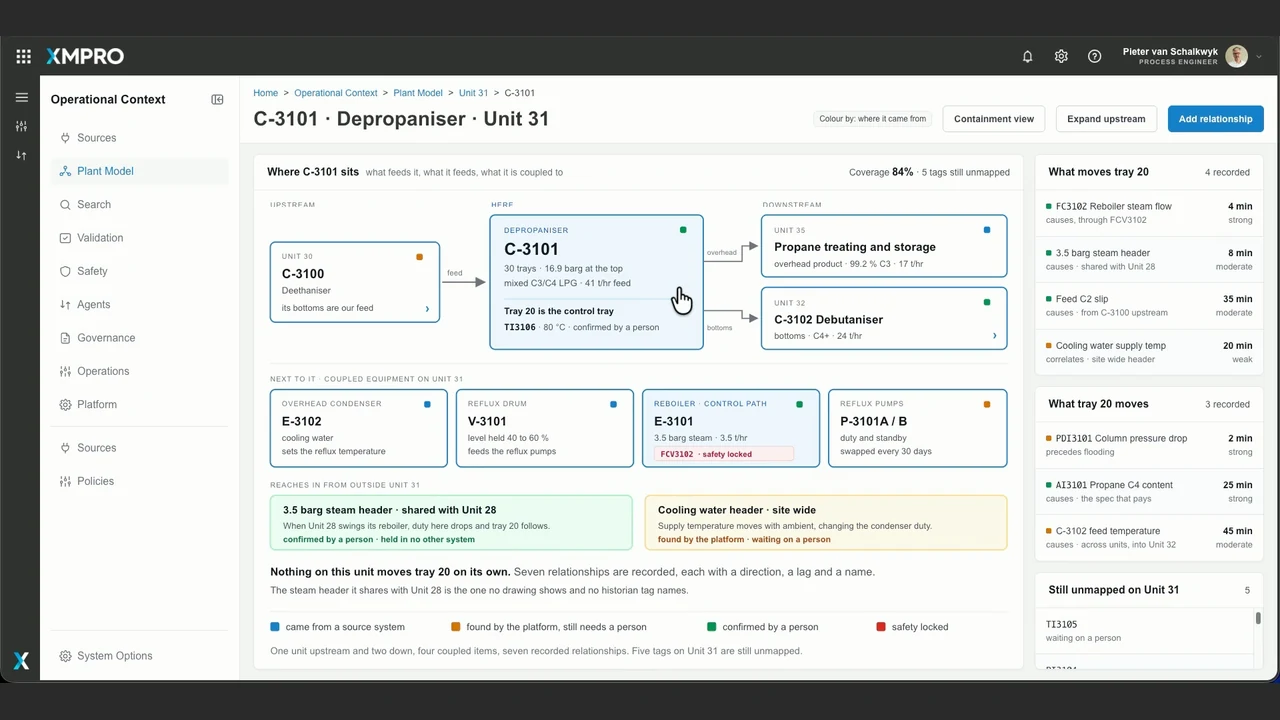
Operational Context › Plant Model › Unit 31
C-3101 · Depropaniser
Where C-3101 sits Feed · process · supporting equipment
UPSTREAMC-3100Deethaniser
feed
UNIT 31C-3101Depropaniser
TI3106Tray 20 temperature
bottoms
DOWNSTREAMC-3102Debutaniser
COUPLED EQUIPMENTE-3101 · ReboilerSupplies heat to the column
CONTROL PATHReboiler steam flowFCV3102Safety locked
3.5 barg steam header · shared with Unit 28Changes outside this unit can affect tray 20.
Human-confirmed
Follow the operating relationships, not just the asset hierarchy.
Place the signal in the process
TI3106 belongs to the depropaniser and measures tray 20 temperature. The equipment relationship gives the tag an operational role.
Follow dependencies beyond this unit
The shared steam header also serves Unit 28. That relationship explains why a change elsewhere can matter here, with human confirmation retained.
Operational Context › Search › Unit 31
TI3106 · Tray 20 temperature
What the historian holds
Tag
TI3106
Descriptor
TRAY 20 TEMP
Units
Not populated
Range
0 to 150
Type
Analog
What OCE holds alongside it
Means
Tray 20 temperature on C-3101
Its job
Control-tray reading for column separation
Connects to
Reboiler steam control
Units
°C Human-confirmed
Valid when
Normal operation Startup at total reflux needs different context.
Nothing movedThe source keeps the reading. OCE retains its meaning and evidence.
Keep the source authoritative
The historian retains its original tag record and reading. Missing source units are shown as missing, not rewritten without evidence.
Add meaning and its conditions
OCE holds the signal’s role, equipment relationships, confirmed units and operating conditions alongside the source. Normal-operation context may not apply during startup.
Operational Context › Validation › Unit 31
Validation Queue
Waiting on a specialist
Column pressure dropPD13101 · safety-relevant
Tray 6 temperatureTI3105 · proposed
Distillate product flowFI13105 · supplier record
TI3105Not yet approved
PROPOSED MEANING
Tray 6 temperature on C-3101
Evidence: its position in the temperature profile and behaviour alongside nearby tags.
Correct, then agreeAgreeReject
RECORD AN EXCEPTIONWhen does this stop being true?
Keep operating conditions and the specialist’s reasoning with the record.
Specialist decision required
Proposed context stays unapproved until a specialist decides.
The specialist makes the call
Correct, agree or reject the proposed meaning after examining its evidence. Human corrections outrank machine proposals, while safety-locked knowledge remains protected.
Record when the meaning stops applying
Keep exceptions and operating conditions with the record. The next person or agent can see the limits of the specialist’s confirmation.
Operational Context › Operations › Unit 31
Readiness
UNIT 31 · DEPROPANISER
0.84 readiness
OPEN GAPMissing engineering unitsNeeds attention
Unit by unit What is holding each one back
31 Depropaniser
0.84
Engineering units on temperature tags
32 Debutaniser
0.79
Incomplete equipment hierarchy
20 Cracker
0.68
Specialist not assigned
↗
NEXT SOURCE TO ADDRESSSite DCS unit export
Close missing engineering-unit information at its source.
Shared context for applications and agents. Remaining gaps stay visible.
Readiness is not permission to act
The score summarises context readiness for this unit. It does not, by itself, grant an agent authority to operate equipment.
Make the next improvement explicit
Missing engineering units point back to the source that needs attention. Readiness makes the remaining work visible, not just the score.
01 / 06 · Start with existing sources
Autoplay · hover to pause
Prepare · Procedural Intelligence Engine
Capture how your experts actually operate.
Procedures, SOPs, and hard-won operator know-how are linked and verified, so agents reason in your operational language.
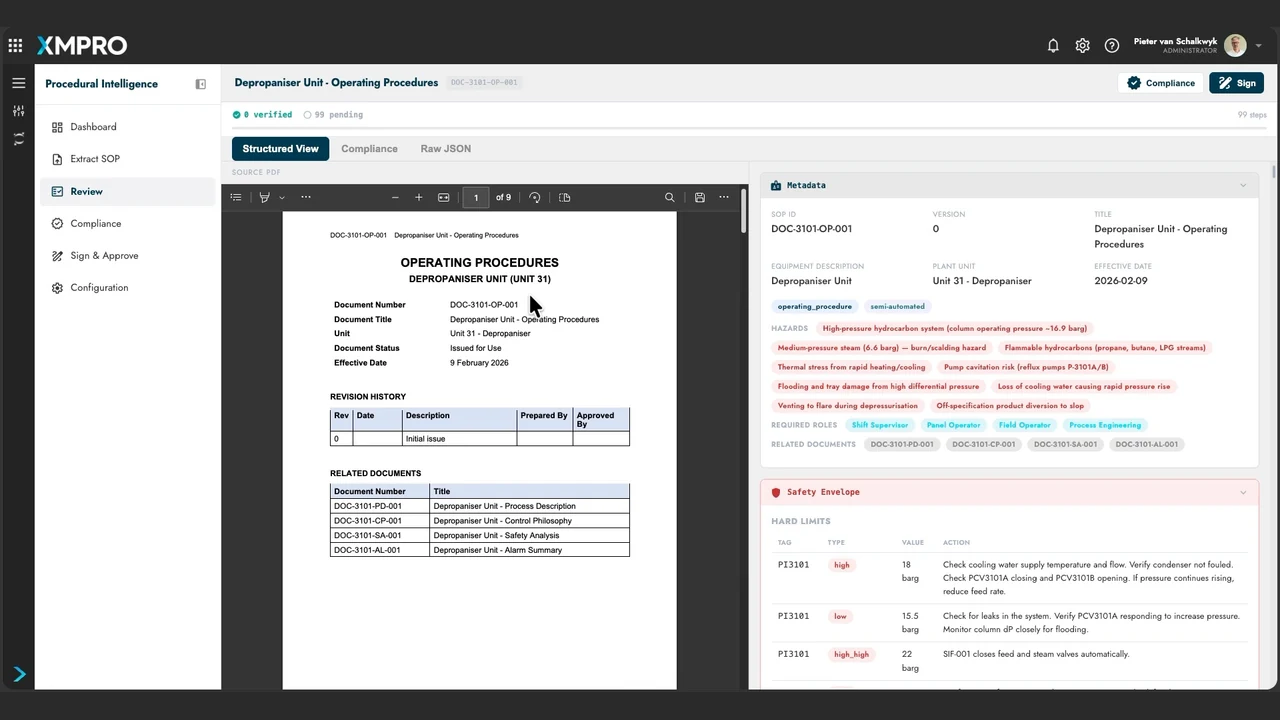
Start with the operating procedure your team already uses. The original PDF remains available for checking the extracted result.
Check meaning across the extraction
Semantic cross-validation checks the emerging structure for consistency. It supports the review draft; it does not replace engineering verification.
DOC-3101-OP-001 · Depropaniser Unit
Multi-pass extraction
Eight focused passes Selected pipeline
01PDF text✓
02Metadata✓
03Safety envelope✓
04Operating parameters✓
05Phase structure✓
06Step details✓
07Abnormal responses✓
08Cross-validation✓
One structured review draft
PDF
DOC-3101-OP-001The same controlled source
Identity + classification
Safety + operating limits
Phases + typed instructions
Abnormal responses
Cross-checked structure
Extraction completeHuman review next
Extraction builds the draft. It does not approve the instructions.
Give each pass a focused job
Text, metadata, safety, parameters, phases, steps, abnormal responses and cross-validation build the result progressively. The configured procedure type determines which passes apply.
One draft, ready for human review
The outputs form a structured procedure with its source references. Extraction is complete here; approval is still a separate step.
DOC-3101-OP-001 · Depropaniser Unit
Review against the source
Structured ViewComplianceRaw JSON
SOURCE PDF § 1.2(b)
DOC-3101-OP-001
Pre-startup checks
Verify the required utilities before proceeding.
Verify instrument air supply is available at normal pressure (6–7 barg) to all control valves on Unit 31.
If instrument air is not at normal pressure, do not proceed. Notify the Shift Supervisor.
PREREQ_02Verification
SOURCE · 1.2(b)
Verify instrument air supply
Before
Maintenance and isolation certificates cleared
Confirm
Normal pressure · 6–7 barg
If not
Do not proceed. Notify the Shift Supervisor.
✓
Verified against the sourceProcess engineer review
Check the actual source passage
The reviewer can compare the extracted instruction with its source section, including the stated limit and escalation condition.
Verification is an engineering decision
The reviewer confirms that this instruction reflects the source. Its preconditions, pressure requirement and escalation note stay together.
DOC-3101-OP-001 · Depropaniser Unit
Review exceptions
VerifiedFlaggedPending
✓
PREREQ_02 · 1.2(b)Instrument air supplyVerified against the source
⚑
PREREQ_03 · 1.2(c)Medium-pressure steam headerFlagged for further review
PREREQ_04Next prerequisitePending verification
Flagged instruction Open
PREREQ_03 · SOURCE 1.2(c)
Review the steam-header prerequisite
The instruction remains linked to its source, with its flagged status visible.
Check the source and resolve the item. It is not silently marked as verified.
Specialist attention required
A verified instruction does not clear another instruction’s flag.
Flag the instruction that needs attention
This steam-header prerequisite stays flagged and source-linked. Verifying another instruction does not resolve this item.
Keep the exception visible
A specialist must check the source and resolve the open item. Flagged and pending states remain distinct from verified instructions.
DOC-3101-OP-001 · Depropaniser Unit
Machine-readable procedure
Structured ViewComplianceRaw JSON
PREREQ_02 Step excerpt
{ "step_id": "PREREQ_02", "type": "verification", "sop_step_ref": "1.2(b)", "description": "Verify instrument air supply", "preconditions": [ "Maintenance and isolation certificates cleared" ], "postconditions": [ "Instrument air confirmed at 6–7 barg" ]}
The same instruction, structured
IdentityPREREQ_02
TypeVerification
SourceSection 1.2(b)
ContextPreconditions + postconditions
Machine-readable does not mean automatically approved.
Give software a typed instruction
The JSON exposes the same step as explicit fields, including its type, preconditions and postconditions. Downstream software can consume the structure directly.
Keep a route back to the evidence
The source reference links PREREQ_02 to section 1.2(b). Machine-readable output retains the grounding a reviewer needs.
DOC-3101-OP-001 · Depropaniser Unit
Compliance assessment
Assessment scope Requirements review
☑
ISA-106Procedure structure
Review findings ↗
☑
IEC 62443Security requirements
Review findings ↗
☑
ISA-18.2Alarm management
Review findings ↗
☑
XMPro SOP QualityCompleteness and clarity
Review findings ↗
!
Open items remain part of the review
Assessment results and outstanding flags travel into the approval summary.
Automated assessment supports review. It is not a certification.
Assess against named requirements
The assessment exposes findings against the selected standards and quality requirements. It supports specialist review; it is not a certification.
Carry open findings into approval
Outstanding flags and assessment results remain part of the review summary. They are not discarded when the workflow moves to signing.
DOC-3101-OP-001 · Depropaniser Unit
Sign & Approve
Review & approval
REVIEW SUMMARY
VerifiedFlaggedPending
SIGNERNamed reviewer · process engineer
APPROVAL STATEMENT
Review of the machine-readable SOP against its source document is recorded.
Sign & Download Bundle
✓Signed SOP bundle
DOC-3101-OP-001 Signed, versioned output
Procedure
Typed JSON + source reference
Approval
Signer + timestamp + review state
Integrity
ECDSA P-256 · SHA-256
Signing protects content integrity. Flagged and pending items remain visible.
Make the reviewer accountable
The approval records who reviewed the procedure and in what role, together with the approval statement and review state.
Sign the content, preserve the review state
The versioned bundle retains the procedure, approval and cryptographic integrity information. Signature verification detects changes to the signed content; it does not clear unresolved items.
01 / 07 · Load the procedure
Autoplay · hover to pause
Phase 02
Execute Autonomy
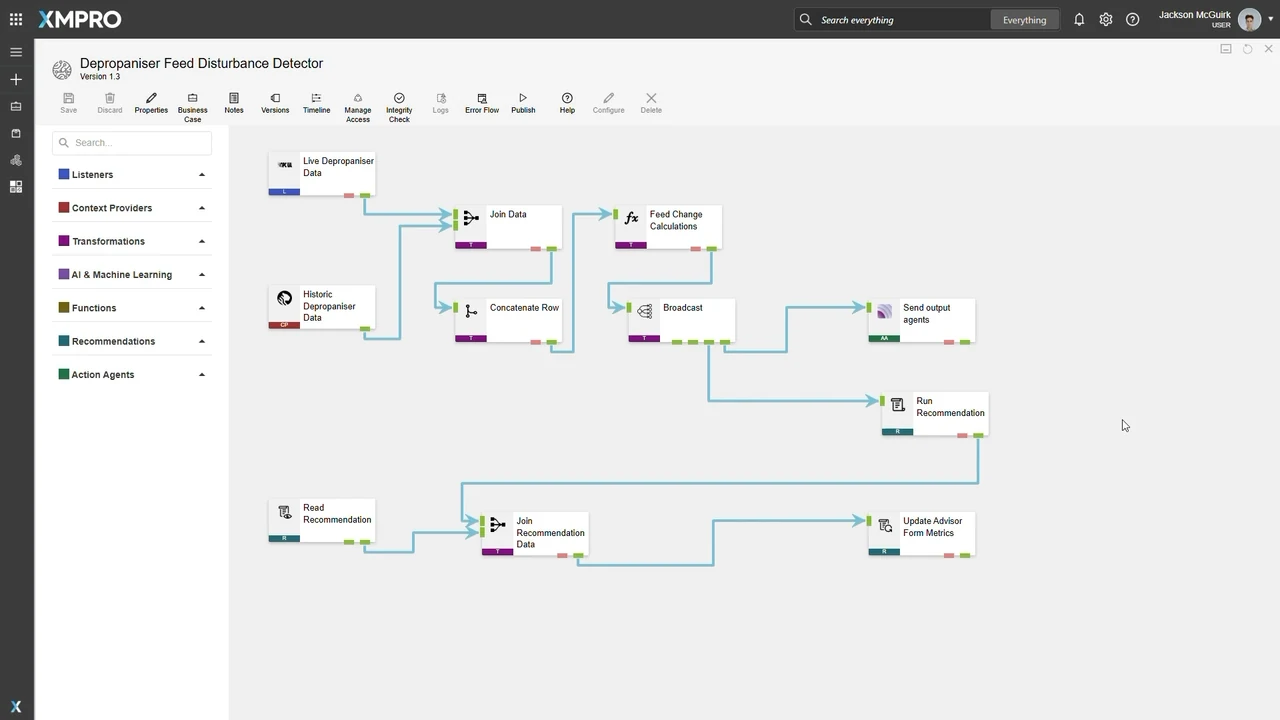
Connect · XMPro Data Stream Designer
Build data streams that power better decisions.
Bring real-time and historical data together. Add context, analytics and AI, then deliver the result to apps, agents and workflows.
Publish the calculated result to the observation endpoint.
RECOMMENDATIONBring the change to an operator.
Trigger the recommendation path when a change is detected.
Publish an observation to MAGS
The MQTT action agent delivers the calculated feed-change result to an observation endpoint. Publishing evidence does not grant authority to change the plant.
Raise a recommendation for review
The recommendation path responds when a feed change is detected, bringing the event into an operator-facing workflow.
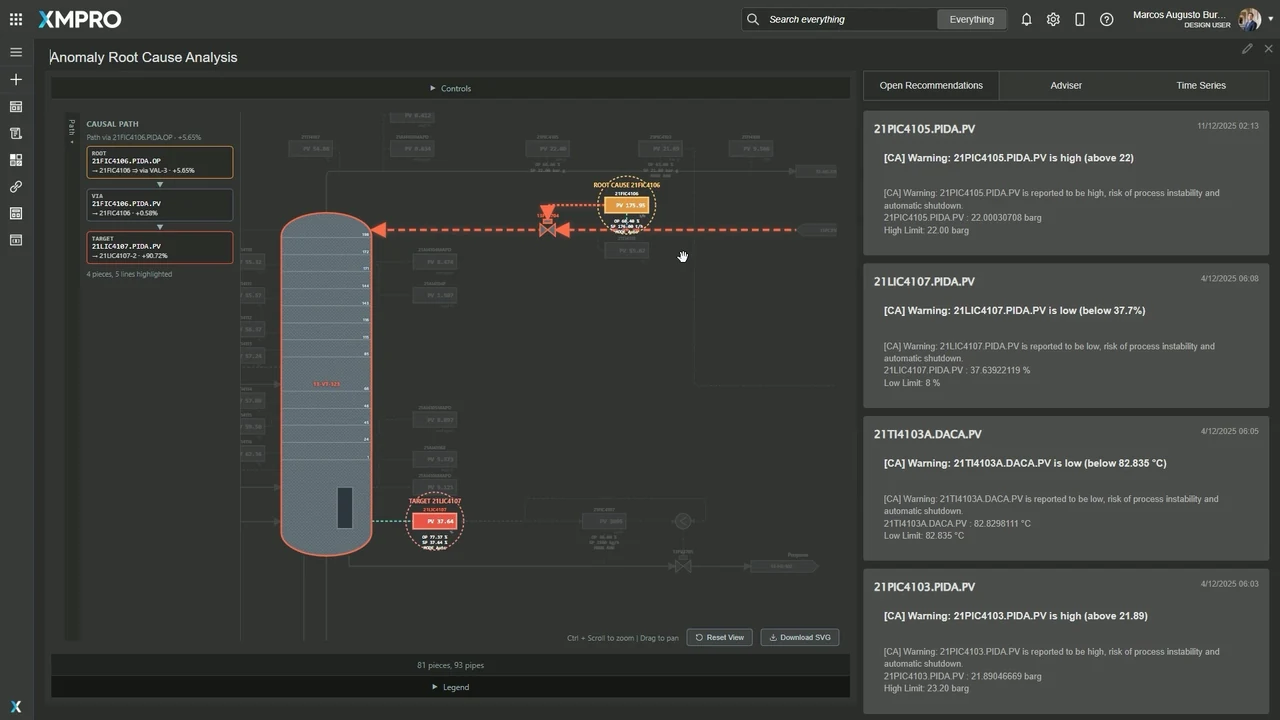
Understand the cause behind the warning.Inspect process →
Start with one specific event
Choose the pressure-drop alert from the open recommendations. The analysis is tied to this event, rather than a generic list of things that can go wrong.
A trend shows the symptom
The rising trace makes the deviation visible. It does not explain which upstream variable caused it; that is the next question.
Differential pressure measures the pressure drop across the column. Locating the signal in the process keeps the symptom connected to the equipment.
Keep the target separate from the cause
The pressure-drop signal is the anomaly being explained. A causal model examines upstream relationships to find likely drivers, rather than treating the alarm itself as the cause.
C3 SPLITTER · ANOMALY ROOT CAUSE ANALYSIS
Follow the path—not just the alarm
Example event
Process viewCausal analyticsEvidence review
Operational context
Causal graphCause → effect
Total differential pressureSelected anomaly
Upper-section pressure dropOn the causal path
Lower-section pressure dropOther contribution
Reflux flowIntermediate variable
Reboiler temperatureProcess context
Reflux temperatureLeading driver
Leading causal pathOther relationships
Trace upstream to the driver
In this example, reflux temperature leads through reflux flow and upper-section pressure drop to the selected anomaly. The highlighted arrows show the direction of influence.
The model comes before this event
The graph represents engineering relationships reviewed before runtime inference. Analysing an alert does not automatically invent a trustworthy causal model from the data.
C3 SPLITTER · ANOMALY ROOT CAUSE ANALYSIS
See which drivers matter most
Example event
Process viewCausal analyticsEvidence review
Operational context
Causal graphCause → effect
Total differential pressureSelected anomaly
Upper-section pressure dropOn the causal path
Lower-section pressure dropOther contribution
Reflux flowIntermediate variable
Reboiler temperatureProcess context
Reflux temperatureLeading driver
Leading causal pathOther relationships
Ranked for this event
Reflux temperature is the leading driver in this illustrative event. The ranking is an attribution to the selected anomaly, not a guarantee that the same factor explains every pressure alert.
Separate the leading cause from other contributions
Reflux-flow fluctuations and the lower-section contribution remain visible. A clear leading path should not erase the rest of the explanation.
C3 SPLITTER · ANOMALY ROOT CAUSE ANALYSIS
Carry the explanation into the decision
Example event
Process viewCausal analyticsEvidence review
Operational context
Event explanationReady for review
SELECTED ANOMALY
High column differential pressure
01
LEADING DRIVERReflux temperature
02
VIAReflux flow
03
VIAUpper-section pressure drop
04
ANOMALY TARGETTotal differential pressure
Before choosing a responseOperator review
Understand why. Then decide what to test.
✓
Inspect the evidence
Confirm the event and causal explanation.
✓
Check the operating conditions
Retain constraints and authority to act.
✓
Test a candidate response
Compare its effect before changing the plant.
NEXT IN THE WORKFLOWFront-Running Simulation →
Keep the reasoning attached
The selected anomaly, causal path and ranked drivers travel together for review. The operator can inspect why a variable was highlighted.
An explanation is not permission to act
Check the evidence, operating conditions and authority before choosing a response. A candidate can then be tested in Front-Running Simulation; this view does not change a setpoint.
01 / 05 · Select an alert
Autoplay · hover to pause
Operate · XMPro FRS
See the impact. Before you act.
Simulate proposed operating changes to compare likely outcomes, expose trade-offs and check limits—before changing the live process.
OPERATING GOALKeep both products in spec. Preserve throughput.
Overhead C4+ ≤ 2.5 mol%Bottoms C3 ≤ 3.0 mol%
Starting state + scenario + goalFront-run this ↗
Change the scenario, not the plant
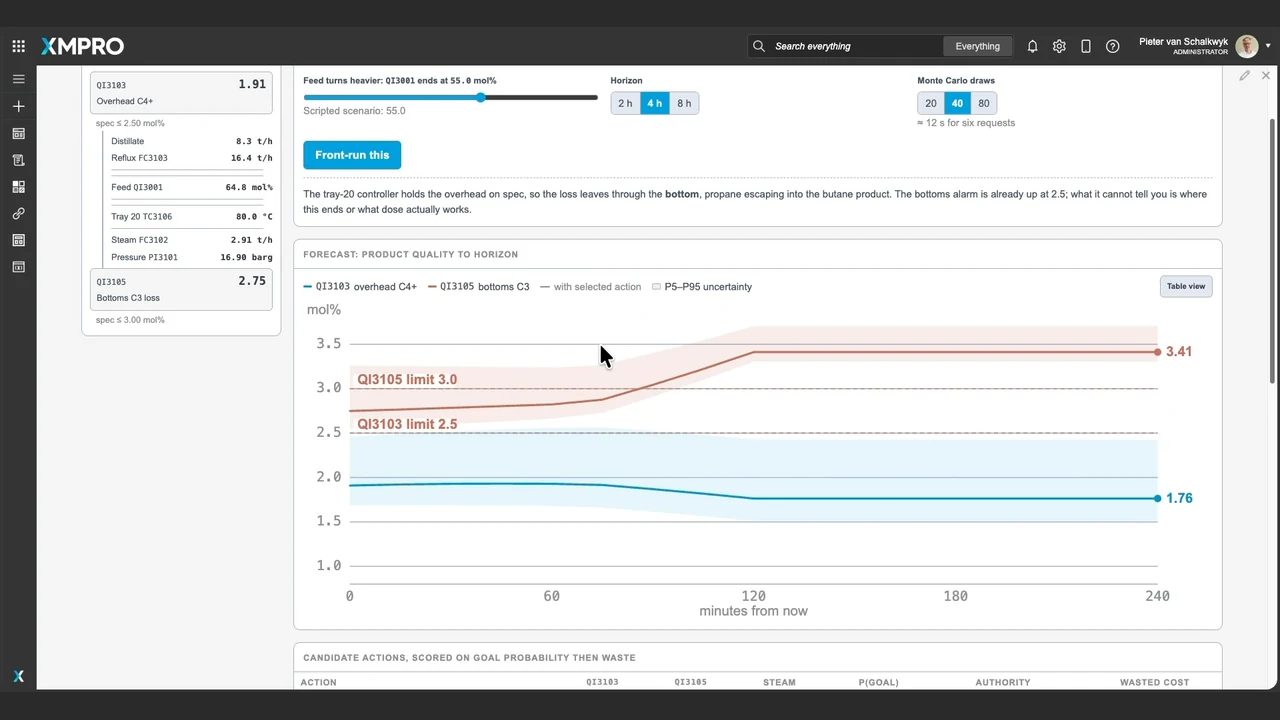
This scenario tests a heavier feed over four hours, starting from the current operating state. The scenario control changes the model inputs; it does not write to the live process.
Define success before ranking actions
This example requires both product specifications while preserving throughput. An option that fixes quality by sacrificing production can still fail the goal.
FRONT-RUNNING SIMULATION · DEPROPANISER
Quality looks healthy. Losses are rising.
Example scenario
Front-runCandidatesAdvisory view
4h horizon · 40 model runs
Do nothingP5–P95 range
Overhead C4+ impuritymol% · lower is betterBottoms C3 lossmol% · lower is better
The hidden loss is in the bottoms
The overhead impurity forecast stays below its limit, but propane loss through the bottoms rises above 3.0 mol%. One healthy quality indicator does not prove the whole column is performing well.
A forecast has a range
The band is the captured 5th–95th percentile range for doing nothing. It expresses model uncertainty, not a guarantee that the process will stay inside that band.
FRONT-RUNNING SIMULATION · DEPROPANISER
The best move must meet the whole goal.
Example scenario
Front-runCandidatesAdvisory view
4h horizon · 40 model runs
Candidate comparisonSame starting state · same goal
Operating move
Quality at 4h
Throughput
Est. P(goal)
Wasted cost
FRS-searched moveReflux + tray temperature
Both in spec
Held
1.00
$14
Incremental redistributionTray temperature only
Both in spec
Held
0.95
$0
Aggressive stabilisationMore reflux, less feed
Both in spec
Reduced
0.00
$847
Slow throughput reductionReduce feed rate
Bottoms off spec
Reduced
0.00
$420
Preemptive shutdownStop production
—
Stopped
0.00
$248,680
RANKING · GOAL FIRST, THEN COSTThe searched move leads.
Higher estimated P(goal) than the cheaper incremental move.
WHY QUALITY ALONE IS NOT ENOUGHBoth in spec. But throughput cut.
Aggressive stabilisation fixes quality and still misses this goal.
Captured example outputs. P(goal) is a model estimate, not a guarantee.
Rank the complete goal
The candidates are ordered by estimated probability of meeting the whole goal, then by wasted-resource cost. In this captured scenario the searched move ranks above the cheaper incremental move.
Fixing quality can still miss the objective
Aggressive stabilisation brings both qualities within specification but cuts throughput. That is why its estimated probability of satisfying this particular goal is zero.
FRONT-RUNNING SIMULATION · DEPROPANISER
Inspect the move before you recommend it.
Example scenario
Front-runCandidatesAdvisory view
4h horizon · 40 model runs
Do nothingP5–P95 rangeSelected at 4h
Overhead C4+ impuritymol% · lower is betterBottoms C3 lossmol% · lower is better
Inspect what would actually change
The selected candidate proposes reflux flow and tray-temperature setpoints. These are proposed model inputs, not applied changes. Authority and operating limits still require review.
An endpoint is not a recovery curve
The selected candidate is solved at the four-hour horizon. Its dot shows that endpoint only. The continuous line and uncertainty band belong to doing nothing; no candidate transient path has been invented.
SIMULATED OUTCOMEBoth qualities in spec; throughput held.
REVIEW BEFORE ACTIONCheck assumptions, limits and authority.
Proposed setpoints have not been applied.
AI AdvisorSimulation evidence
Why this option over the cheaper one?
AI
The searched move has an estimated P(goal) of 1.00, compared with 0.95 for the incremental move.
It preserves throughput at a modeled wasted-resource cost of $14 versus $0.
Those estimates depend on the current inputs and model assumptions.
ScenarioCandidate resultsOperating goal
Ask about the recommendation ↑
Explain the trade-off
The selected move has a higher estimated probability of meeting the complete goal than the cheaper option. The model assumptions and resource cost stay visible alongside that comparison.
Evidence comes before authority
Simulation supplies evidence for the decision. A presenter can inspect the proposed changes and assumptions; this demonstration neither authorises nor sends setpoints to a control system.
01 / 05 · Set the scenario
Autoplay · hover to pause
Operate · Decision Intelligence
Put the next best action in front of the operator.
Bring live context, AI advice and recommended actions into one role-specific workspace—with the operator in control.
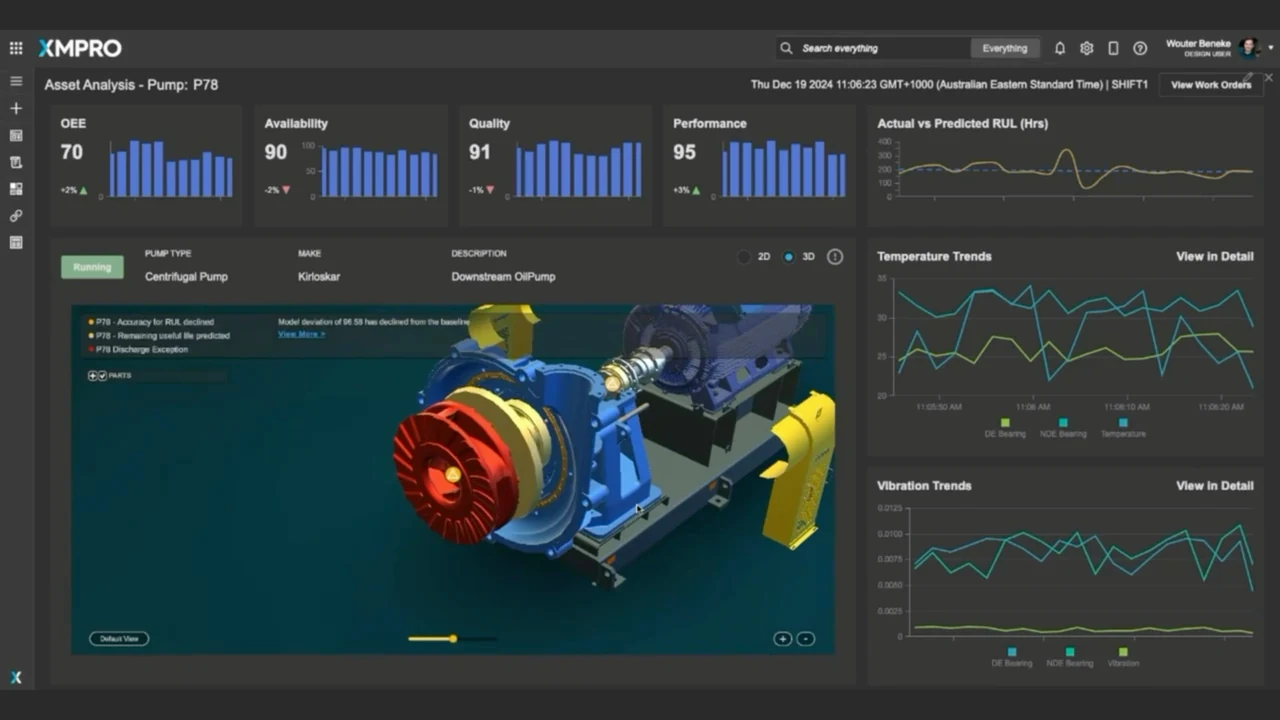
The published application combines an asset model, nameplate information, current readings and history. The operator does not have to interpret a detached chart without knowing which equipment it describes.
Surface the decision that needs attention
The pump performance alert leads into a recommendation for review. An alert identifies a decision to investigate; it is not a confirmed diagnosis or an instruction to change the equipment.
APP DESIGNER · VISUAL COMPOSITION
Build the workspace around the operator.
Example workspace
DesignPreviewProperties
App builder
Asset Analysis · Pump P78Design canvas
OPERATING STATUSRunning
PERFORMANCEReview
P78Rotating equipment · Pump
FLOW PERFORMANCE
Chart · selected
AI ADVISORAssessment
RECOMMENDATIONSOperator actions
▥ Chart
Compose with business components
App Designer provides configurable visualisation, layout, action and recommendation components. This sequence places a chart into the pump workspace rather than building another disconnected dashboard.
Bind the component to its context
Configure the chart’s data source, asset filter and fields. Placing a visual on the canvas is only part of the job; its operational context has to be configured too.
ASSET ANALYSIS · PUMP P78
Turn the condition into a useful assessment.
Example workspace
Asset overviewAI AdvisorRecommendations
Operator-led
Asset Analysis · Pump P78Current context
P78Internal view · Pump
AVAILABLE TO THE ADVISOR
Current readingsNameplate detailsMaintenance history
INITIAL ASSESSMENT FROM AI ADVISOR
Observation
Flow is below the expected operating level.
Possible explanation
A restriction or pump condition may be contributing.
Next checks
Confirm the reading. Inspect the suction path.
AI Insights DiscussionIn asset context
EXPLORE THE CONDITION
What is the health of my pump?›
What could explain the low flow?›
Which checks should we make first?›
AI
Advice you can interrogate.
Ask about the condition, possible causes and practical next steps.
Ask about this asset ↑
Separate observation from interpretation
The assessment distinguishes a low-flow condition from possible causes and the checks needed to investigate. A possible suction restriction is not presented as an established root cause.
Advice needs operational context
Current readings, the asset’s rated condition and maintenance history inform the discussion. The operator still needs to validate the measurement and test the suggested explanation.
RECOMMENDATION MANAGER · PUMP P78
Question the advice. Inspect the evidence.
Example workspace
RecommendationDiscussionTimeline
Operator-led
!
Pump P78 has a performance alertRecommendation open · operator review
Not resolved
Event DataSource
Flow rateBelow expected
Inlet / discharge pressureEvent readings retained
Bearing vibrationTrend available
Maintenance historyAvailable for review
AI ResponseAssessment
Pump performance analysis
Flow variance
Confirm the flow reading against the expected operating condition.
Possible causes
Review suction restrictions, component condition and operating conditions.
Recommended next step
Arrange an inspection and a flow check before choosing corrective work.
CopilotDiscussion · Timeline
What are the most likely causes of the low flow?
AI
Check these possibilities:
Suction or impeller blockage
Wear in pump components
Air ingress or unsuitable operating conditions
These are hypotheses. Confirm the cause through inspection and testing.
Ask a follow-up ↑
Keep the underlying event inspectable
The recommendation retains the event data used for the assessment. The source interface exposes the readings alongside the AI response, so the operator can check the basis of the advice.
Challenge the explanation before acting
The operator asks about the low-flow condition. The response offers possible causes and practical checks, not a certainty score. Operational judgement remains part of the decision.
RECOMMENDATION MANAGER · PUMP P78
The operator chooses what happens next.
Example workspace
RecommendationDiscussionTimeline
Operator-led
Recommendation DetailsPump P78
Investigate the pump’s low-flow condition.
Review the evidence, then select the appropriate response.
OPERATOR CONTROLS
Assign to maintenanceMark false positiveMark resolved
OPERATOR NOTE
Confirm flow and inspect the suction path before planning corrective work.
Investigation required · fault remains open
Event dataAI responseDiscussion
FormTriage instructionsTimeline
Work Request NumberNot yet created
Work Order Status—
Request TypeInspection ⌄
Special Instructions for Work Request
Check the suction path and confirm actual flow. Follow the approved inspection and isolation procedures.
Create Work RequestPrepared for review · not submitted
Choose, assign, or reject
Recommendation Manager exposes assignment, false-positive and resolution controls. In this example the operator prepares an inspection request; the fault is not marked resolved simply because AI produced advice.
Turn the choice into an accountable next step
The work-request form captures the request type and special instructions. This example prepares a maintenance request; it neither executes a plant change nor submits a real request from the homepage.
RECOMMENDATION MANAGER · PUMP P78
Keep the evidence with the handoff.
Example workspace
RecommendationDiscussionTimeline
Operator-led
Recommendation timelinePump P78
01
Condition observed
Pump performance alert opened.
02
Advice reviewed
Event data and possible causes inspected.
03
Action chosen
Confirm flow and inspect the suction path.
04
Handoff prepared
Maintenance request drafted with the evidence.
Work requestDraft
CHOSEN NEXT STEP
Inspect first. Then plan the work.
Receiving team
Maintenance
Decision owner
Operator
Evidence
Retained with the recommendation
Next gate
Review and submit the request
Prepared is not completed.
The fault stays open until the work and outcome are reviewed.
Retain the path to the choice
The event, reviewed advice and selected inspection stay connected in the record. This is a human decision history, distinct from the autonomous agent activity in the next platform stage.
Keep ownership and completion separate
The draft names the receiving team and next action. A prepared work request is not a completed repair: maintenance review and execution still need to happen.
01 / 06 · See the operating picture
Autoplay · hover to pause
Autonomous · MAGS + APEX
Let agents act within the bounds you set.
Inside explicit authority, MAGS agent teams execute the routine calls and escalate the exceptions, with every step recorded to a Decision Trace.
Suspend and escalate when a safety rule is triggered.
Compliance requirements and source provenance stay attached.
APEX makes success explicit
APEX is the design and delivery discipline: business value, operating objectives, constraints and authority become an explicit operating contract. MAGS then implements that design in the team configuration.
Safety is not a weighted preference
The source separates objectives from non-negotiable operating principles. Improving recovery or cost does not permit an agent to bypass a safety rule or its authority.
MAGS CONFIGURATION · UNIT 31
Give each specialist a clear responsibility.
Example sequence
ConfigurationAgent InstancesHistory
Design
Agent Instances5 configured instances
SESeparation Expert
Decision
Separation state + quality margins
Edit instance ↗
EEEconomic Expert
Decision
Recovery value + operating cost
Profile configured
POProcess Optimiser
Decision
Candidate changes + coordination
Profile configured
SGSafety Guardian
Decision
Safety constraints + approval
Profile configured
DADepropaniser Assistant
Assistant
Questions + operational knowledge
Profile configured
Edit Agent InstanceSeparation Expert
DetailsConstraints & Responsibilities
CONSTRAINTS
No direct setpoint writes
No economic or market assessment
Safety assessment belongs to the Guardian
RESPONSIBILITIES
Assess the separation state
Report product-quality margins
Share a structured assessment with the Process Optimiser
Build a team of distinct specialists
The source team has four decision specialists and a depropaniser assistant. Profiles define distinct responsibilities; the agents are not interchangeable copies of one general-purpose assistant.
Separate expertise from authority
The Separation Expert assesses the separation state. It does not write setpoints, evaluate economics or replace the Safety Guardian. Those constraints remain explicit in the agent instance.
MAGS CONFIGURATION · UNIT 31
Limit what agents can actually do.
Example sequence
ActionsPolicy ConstraintsHistory
Design
ActionsConfigured
Operator EscalationRoute exceptions to a person
Write SetpointsBounded control actionSafety critical
Only approved actions.
Available tools and authority are configured before the team acts.
Write SetpointsConfiguration
PARAMETERS
Reflux setpointNumberWithin configured range
Tray temperatureNumberWithin configured range
IntentTextTighten · relax · revert
Guardian pre-approval
Bound the action. Bound the values.
Retain the reason for the write and its decision record.
Within authority: act and monitor. Outside authority: hold and escalate.
An approved action catalogue
The Actions register defines the tools available to a configured agent. An agent cannot turn an arbitrary suggestion into an unrestricted plant write.
Bound the parameters too
Write Setpoints has typed parameters, configured ranges and an intent recorded for audit. The operating principles also require the Safety Guardian’s pre-approval before a write.
TEAM ACTIVITY · UNIT 31
Independent agents. Shared evidence.
Example sequence
Team activityDiscussionDecision trace
Runtime
Publishing to broker
SESeparation Expert
ORPA
REFLECT
Assess separation and product-quality margins.
Decision trace Full trace ↗
Publishing to broker
EEEconomic Expert
ORPA
REFLECT
Evaluate recovery value against steam demand.
Decision trace Full trace ↗
Publishing to broker
POProcess Optimiser
ORPA
PLAN
Propose an adjustment using the shared evidence.
Decision trace Full trace ↗
Publishing to broker
SGSafety Guardian
ORPA
REFLECT
Check the candidate against policy and authority.
Decision trace Full trace ↗
ORPA timelineIndependent cycles
ObserveReflectPlanAct
Separation Expert
Economic Expert
Process Optimiser
Safety Guardian
Each specialist advances on its own evidence.
Broker messagesPublish · subscribe
SE
Separation assessment published.
Shared
EE
Economic trade-off shared.
Shared
PO
Candidate adjustment proposed.
Shared
SG
Safety and authority checks underway.
Shared
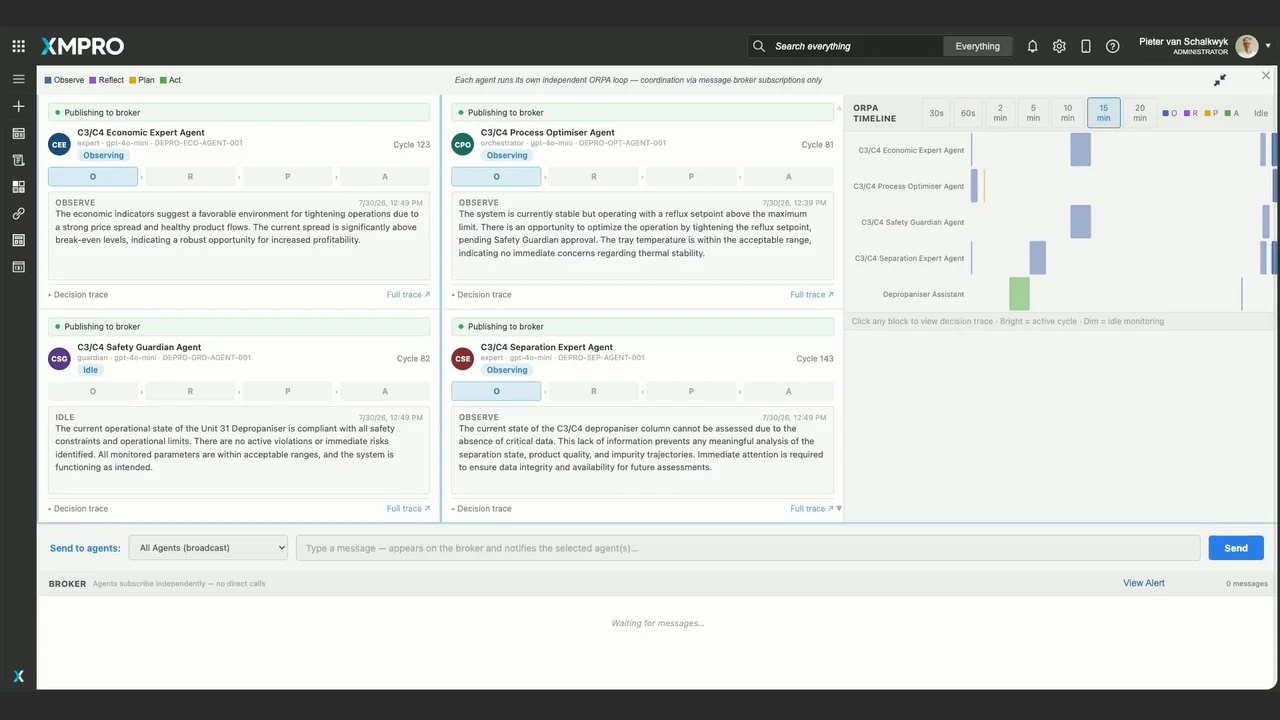
Each agent runs its own loop
Observe, Reflect, Plan and Act are independent per-agent cycles. The different highlighted phases are intentional: this is not a single central workflow advancing every agent in lockstep.
Coordination happens through messages
Agents publish observations and proposals to the message broker and subscribe independently. The shared workspace makes those exchanges visible without implying direct calls or a central orchestrator.
PLANNING & CONSENSUS · UNIT 31
Challenge the plan before it acts.
Example sequence
Team activityDiscussionDecision trace
Runtime
Agent Team CommunicationPlanning & consensus
SE
Separation Expert
Keep overhead and bottoms quality within their approved limits.
Quality constraint
EE
Economic Expert
Compare the recovery benefit with the extra steam demand.
Value trade-off
PO
Process Optimiser
Propose a reflux adjustment inside the configured action range.
Candidate proposal
SG
Safety Guardian
Proceed only with the checked parameters and required authority.
Conditional clearance
Candidate proposalPending authority
PROPOSED NEXT STEP
Adjust reflux. Preserve the limits.
Separation evidence retained
Economic trade-off reviewed
Safety conditions attached
Approved action and parameters
Agreement is not execution.
This proposal is held for operator review.
Specialists challenge the same candidate
Separation, economic, process and safety viewpoints contribute different evidence and constraints. Their agreement is distinct from permission to execute.
Consensus does not bypass controls
The candidate still has to satisfy the approved action, parameter limits, policy and authority checks. In this illustrated path, a human reviews the held proposal before it proceeds.
AGENT CHATROOM · UNIT 31
Keep human authority in the loop.
Example sequence
Team activityDiscussionDecision trace
Runtime
Agent ChatroomUnit 31 · team channel
Paused by operatorPending action held.
OPERATIONS SUPERVISOR
Show the evidence and safety checks before proceeding.
SAFETY GUARDIAN
The checked proposal retains the operating limits and approved parameters. Evidence is attached.
View decision trace ↗
OPERATIONS SUPERVISOR
Approve this checked proposal. Continue monitoring.
Message the team Send
Authority checkpointThis instruction only
HUMAN CONTROL
Pause. Question. Approve or hold.
Pause & ReviewManual override
A person can interrupt the autonomous path without losing its context.
Approval recordedChecked proposal authorised.
Policy checks and monitoring remain in force.
A person can interrupt autonomy
The source chatroom exposes pause, questions and manual intervention. Here, the operator holds a pending action and asks for the evidence before authorising the checked proposal.
Approval belongs to this proposal
A human approval does not disable the guardrails or grant open-ended authority. It applies to the reviewed instruction; checks and observation still accompany execution.
AGENT CHATROOM · UNIT 31
Verify the outcome. Retain the trace.
Example sequence
Team activityDiscussionDecision trace
Runtime
Decision traceUnit 31
01
Evidence observed
Condition and source context retained.
02
Proposal checked
Specialist views and policy checks attached.
03
Authority recorded
The held instruction receives approval.
04
Action acknowledged
The approved instruction is received and completed.
05
Outcome verified
Monitoring confirms the response before closure.
Execution & observationTrace retained
INSTRUCTION GIVEN
Approved action. Observed response.
SentReceivedCompleted
RESPONSE AFTER THE ACTIONIllustrative response · not a performance metric
Close on evidence, not agreement.
The decision and observed outcome remain inspectable.
Inspect the whole decision trail
Keep the observed condition, specialist evidence, safety checks, authority and execution record together. This is an autonomous decision trace, not the earlier operator work-request draft.
Completed and verified are different
Acknowledging an instruction is not proof of a safe outcome. The source shows execution followed by monitoring and confirmation. The small response trace here is illustrative, not a performance claim.